Aria Tunic
A long tunic, shaped, straight or A-line, with side slits, four necklines and four sleeve lengths.
Create sewing patternProduct Creation / Laser cut
Upload a product photo, or pick a product and type its size. Choose your material, check the parts on the sheet, then download cut files for your laser machine.
New: beading patterns from a photo
Sewing patterns, laser cut files, beading charts and Etsy listings in one studio. Upload a photo, check what we read, and download files that are ready to print, cut or publish.
Product Creation
Every tool reads your photo, shows you what it found so you can fix any number, and gives you files that are ready to print, cut or publish.
Upload a product photo and its size chart. Get print-ready pattern files for one size or the whole chart, with sewing steps and a cutting guide.
Make a patternBoxes, trays, signs, frames, clocks and custom designs from your photo, laid out on your sheet in S, M, L and XL.
Make cut filesLoom, peyote, brick and square stitch charts, or step diagrams, with every bead counted and A4 and Letter PDFs.
Make a bead chartA title, 13 tags, description, FAQ and attributes from your photos, checked against Etsy limits.
Write a listing15 shop names in three styles from live Etsy and Google keyword research, each with a score.
Find a nameIn every download
Every file comes from the same checked result, so the numbers on the chart, the cut sheet and the guide always agree.
How it works
Pick a tool and add a product photo. Add a size chart, a material or a competitor listing when the tool asks for one.
Every size, part, color and keyword is shown before any file is made, so you can change any number first.
Print, cut, bead or publish. Every download comes in one ZIP with guides, and your own logo if you add one.
The collection
One sewing pattern, one laser cut design and one beading pattern, each made by its own tool. Open a tool to make yours.
A long tunic, shaped, straight or A-line, with side slits, four necklines and four sleeve lengths.
Create sewing patternA mandala wall piece and two matching ornaments: cut outlines, engraved details and score rings, ready to cut.
Laser cut designsA 3D beaded puppy with round-by-round steps, every bead counted by color, and a preview of the finished look.
Beading patternPhoto to pattern
Claude reads the garment style from the product photo and every size from the chart. Check the numbers, then download pattern files for one size or the whole chart.
Claude reads these together with the photos. A clear title and description help it pick the right product.
Add one or both photos, then press Read photos.
Add your store logo and details. They print on every PDF, SVG and DXF you download, in place of ours. Saved in this browser.
Something wrong or missing? Fix it here, one part per line, then press Draft pattern. Claude follows this when it drafts a custom pattern.
One set of files per size. Width and length are factors of the drafted pattern, read from the size chart. Change them or add a size if you need to.
Leave anything blank and it is worked out from the photo: the product, its size, material and thickness. Everything can be changed after.
Add a product photo and press Read photo, or pick a product below and type its size.
Kerf is the width the laser burns away. Picking a material fills in a usual value for it; every machine differs, so cut a test corner first.
Each download has SVG, DXF, LightBurn (.lbrn2) and EPS files for every sheet and size (red cut, blue engrave, green score, black reference), a 1:1 vector PDF, a preview picture, an assembly guide with 3D step drawings, cutting, material and dimension guides, and a read-me. Joints allow for the kerf and are drawn again for every size.
Add product photos and press Create beading pattern. It takes a few minutes.
Each download has the complete pattern as A4 and US Letter PDFs, a 3000 x 3000 preview picture and a read-me, plus only the extras the product needs: a large color chart, an editable SVG chart, a row-by-row checklist, an assembly guide and bead data for spreadsheets. Bead counts, row-by-row instructions and checks are all made from the same pattern, so they always agree.
The listing is written differently for downloads and for items you ship.
Photos and details are the only facts we write from.
Used only to learn their search words and gaps. Never copied.
Research and writing take a few minutes. Anything you leave out is marked [SELLER TO CONFIRM], so nothing is made up.
Pick one below or type your own.
Leave these empty and we choose from the research.
We research your niche on Etsy and Google first, which takes about a minute.
Real results
These are real files from each tool. Pick a tool to see what you upload and what you get back.
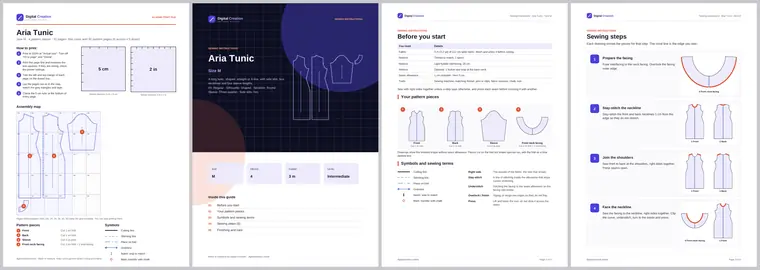
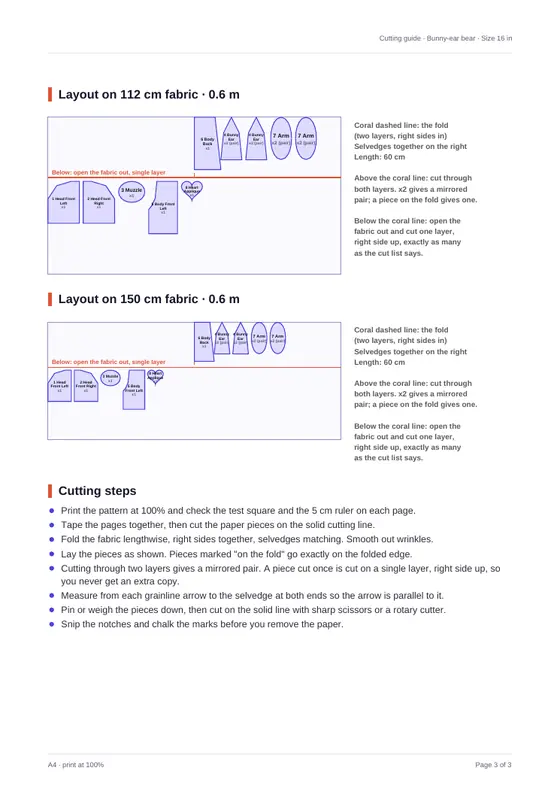
Tiled A4 and Letter pages, A0, projector, SVG, DXF, sewing steps and a cutting guide for every size.
Create sewing pattern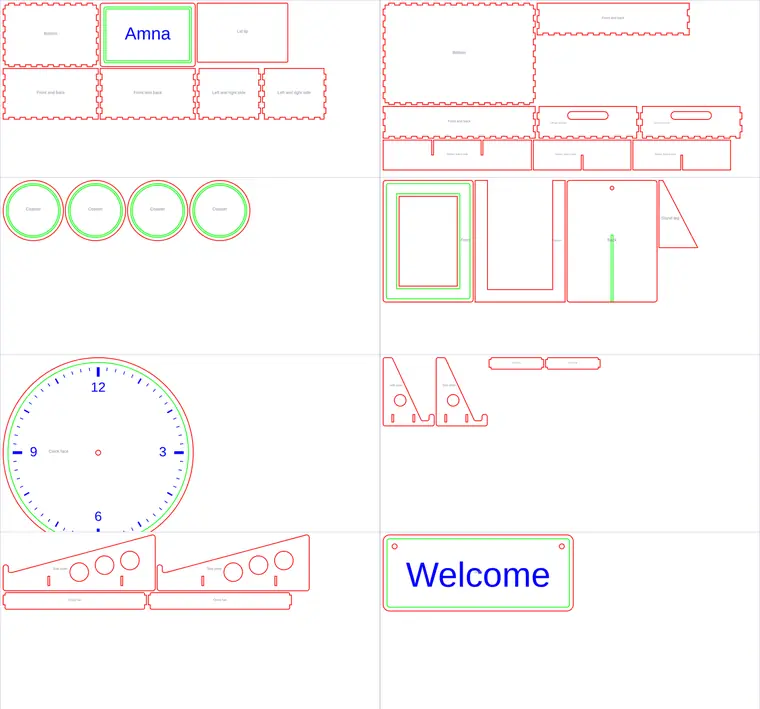
SVG, DXF, LightBurn and EPS files for every sheet and size, a 1:1 PDF and assembly guides.
Laser cut designs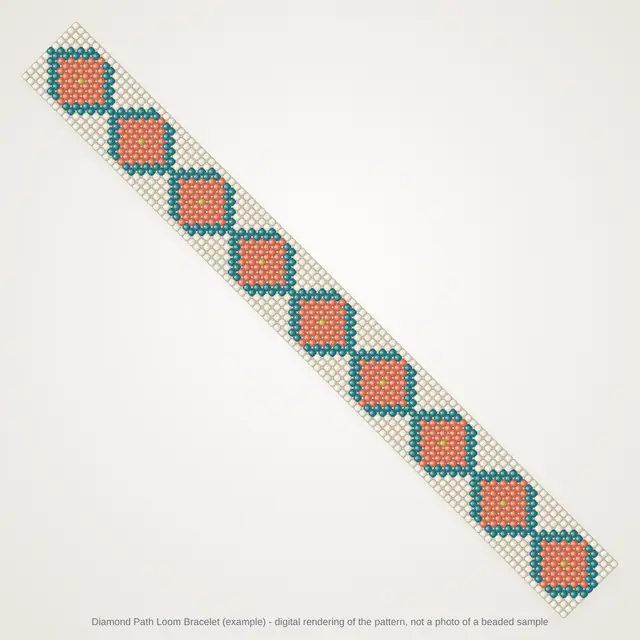
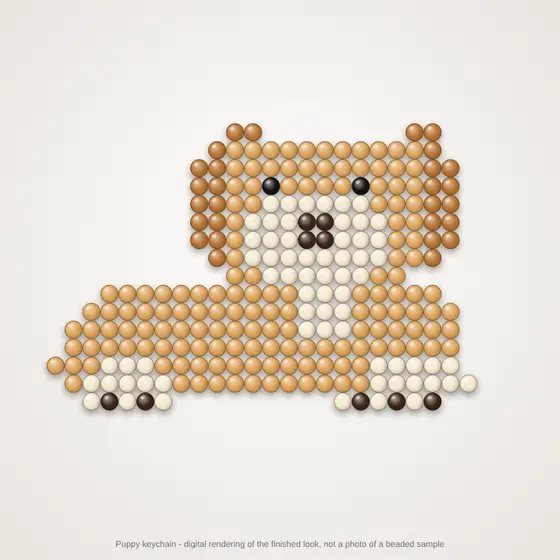
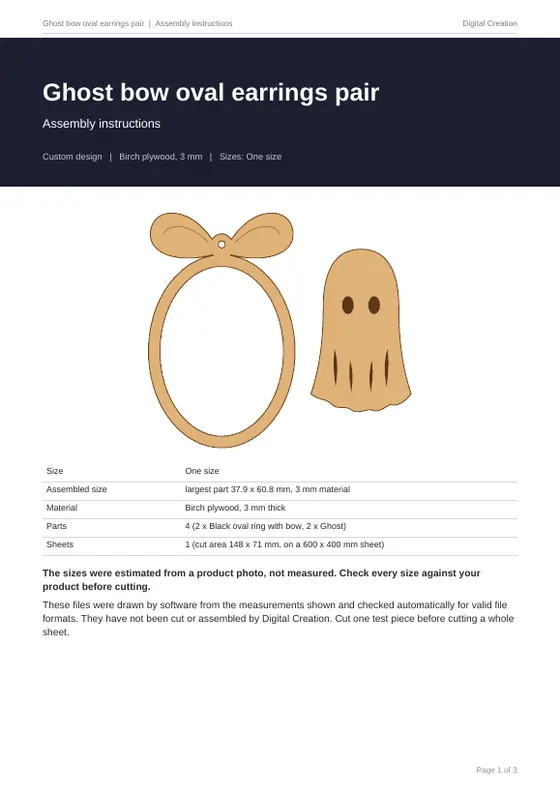
Bead charts or step diagrams, bead counts with spares, A4 and Letter PDFs and a preview picture.
Beading pattern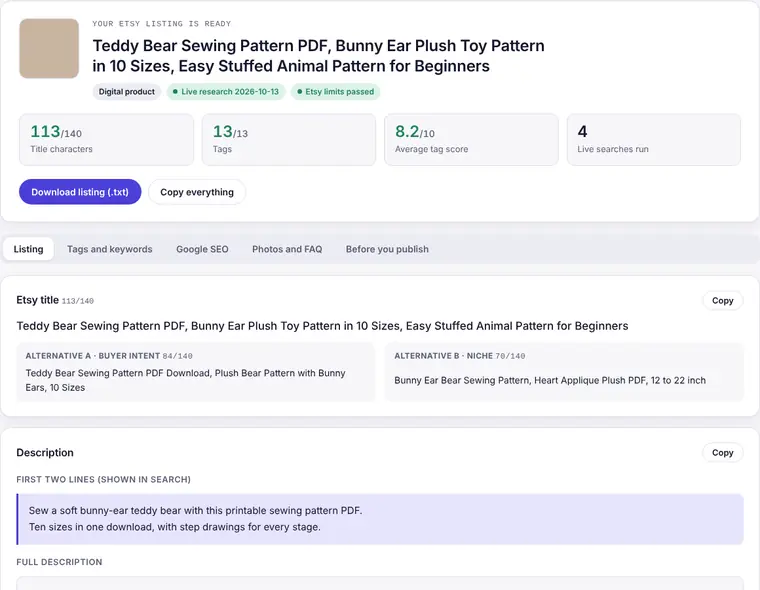
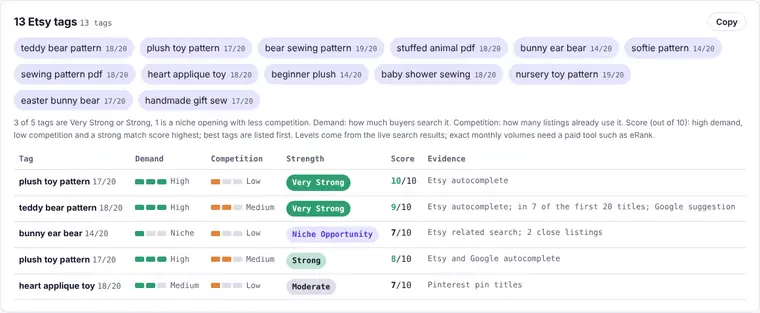
A title, 13 rated tags, description, FAQ, attributes and Google SEO, checked against Etsy limits.
Etsy listing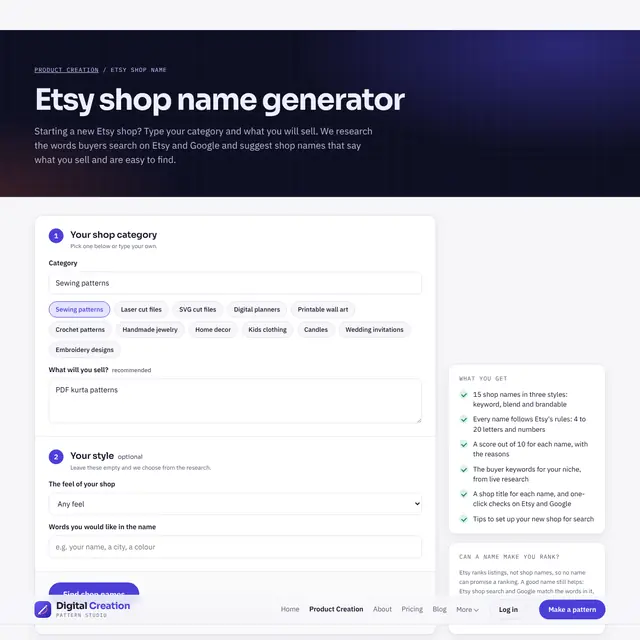
15 names in three styles, each 4 to 20 characters, with a score, a shop title and Etsy and Google checks.
Etsy shop nameTry it live · Pattern builder
Demo This builder is a live preview, so downloads are switched off here. To get pattern files, use Create sewing pattern.
Sewing measuring guide
Measure over light clothing with a soft tape held snug, not tight. Ask someone to help with shoulder and lengths.
Standard size chart, cm
This starter chart is for drafting. Compare it with a garment that fits you well before cutting.
Pricing
Preview every design for free. A plan lets you download pattern files: each pattern is one product with all of its sizes and files, and downloading it again in the same month does not count twice.
Loading plans...
Compare
All paid plans include every file and every feature. They differ only in how many patterns you can download each month.
Questions
One product with its whole size chart and all of its files. Download one size or every size: it counts as one pattern. Downloading it again in the same month does not count twice.
Choose a plan, pay to the account shown, then send the transaction ID and a screenshot. Your plan switches on as soon as the payment is checked, for 31 days.
Buy again any time. The new patterns start at once; you do not have to wait for next month.
Yes. Every design and size can be previewed for free. You only need a plan to download the pattern files.
Yes. Use "Add your logo" to put your logo, store name and details on every page and file you download.

Meet the founder
Hi, I am Ali. I built Digital Creation for tailors, makers, small brands and Etsy sellers who are tired of redrawing the same pattern, file or listing again and again.
My idea was simple: take a product photo and give back files you can trust. A sewing pattern with true-scale tiles, laser cut files with joints that fit, a beading chart with every bead counted, and an Etsy listing buyers can find. Software does the drafting, so you can spend your time making and selling.
“A good pattern should feel like a skilled cutter is standing next to you, measuring twice so you only cut once.”
Help
Printing, cutting, beading and selling. Still stuck? Message us and we will help.
Pick the one for what you make: sewing patterns for clothes and soft products, laser cut for wood and acrylic, beading pattern for beaded jewelry and decor. Selling on Etsy? Use Etsy listing for each product and Etsy shop name when you open a new shop.
Yes. Sizes, parts, materials and details are shown before any file is made. Change any number, then download.
Yes, to read photos. An account keeps your monthly limit and your downloads together. Plans are on the pricing page.
Open the PDF and choose "Actual size" or 100% scale. Never "Fit to page". Measure the 5 cm square on the first page; if it is not 5 cm, check your printer settings.
Each page is labelled with a row letter and column number (A1, A2, B1...). Trim the left and top margins, overlap the edges so the grey triangles form diamonds, and tape.
Yes, unless you choose "None". The solid line is the cutting line and the dashed line is where you stitch. Waist casings and hems have their own allowance.
Drafted patterns are a close start. Sew a quick test garment (toile) in cheap fabric, note any changes, update your measurements and download again.
LightBurn opens the .lbrn2 file. Most other software opens the SVG or DXF, and the EPS file works in design programs. Red lines cut, blue engrave, green score and black is for reference.
Joints allow for the kerf, the width the laser burns away. Picking a material fills in a usual kerf for it, but every machine differs, so cut a test corner first.
Loom, peyote, brick and square stitch get bead-by-bead charts. Flowers, 3D pieces and wire work get illustrated step diagrams.
Yes. Bead counts, row-by-row steps and checks are all made from the same pattern, so they always agree. Spares are added to every color.
No. We write only from your photos and details. Anything you leave out is marked [SELLER TO CONFIRM]. A competitor listing is used only to learn its search words and gaps, never copied.
Yes. Every name is 4 to 20 characters, and each comes with one-click Etsy and Google checks so you can see if it is free.